
One true record for every student — from admission to TC
The office register, the class teacher's diary, the accounts ledger and the transport list all describe the same child — and they rarely agree. Nexgen School keeps one record that every department works from, so a change made once shows up everywhere.
What it fixes
- Student details copied into five registers — and different in each
- Searching cupboards for a birth certificate when a TC is requested
- Promoting 1,000 students to the next class takes days of manual work
What changes
Every child's record — profile, parents, siblings, documents and history — in one place.
- Admissions register, TC and certificates in seconds.
- Class list with parent contacts on the phone.
- See their child's profile and update contact details.
Everything in Student Information System
Complete profile
Photo, date of birth, blood group, address, previous school, admission number and roll number — with your own numbering format.
Parents & siblings
Both parents and guardians with mobile and email. Siblings are linked, so one parent login sees all their children and sibling concessions apply automatically.
Documents vault
Upload birth certificates, transfer certificates and Aadhaar copies. Files are private and open only through short-lived secure links.
Bulk import from Excel
Fill our template (class and section in plain words like “Class 5, A”), upload, review the preview and import hundreds of students in minutes.
One-click promotion
Move a whole class to the next academic year, hold back individual students, and keep every year's history.
Leaving & alumni
Mark students as left with reason and date, issue the TC, and they move to the alumni list automatically.
Instant search
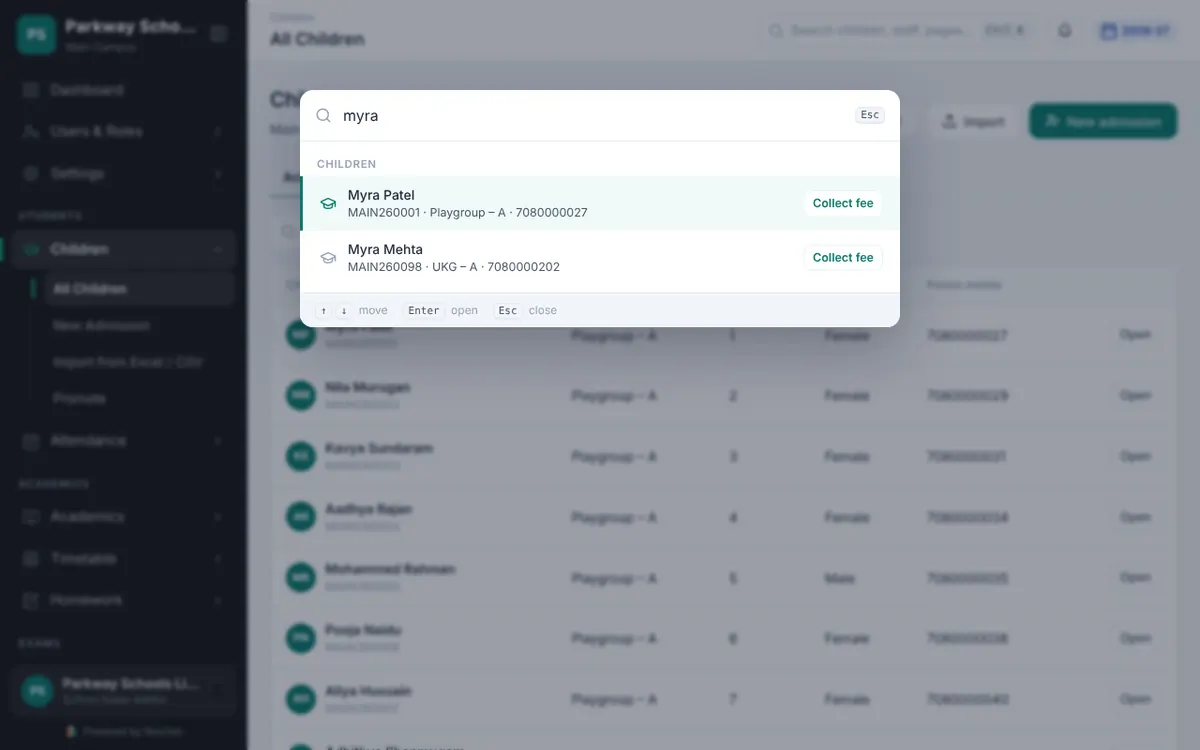
Press Ctrl+K and find any child by name, admission number or parent's mobile — then collect fees straight from the result.
Parent logins ready
Create parent and student logins with starting passwords and print credential slips for the whole class.
Up and running in three steps
Import
Upload your Excel sheet or add students one by one.
Check
The preview flags duplicates, missing classes and bad phone numbers before anything is saved.
Use everywhere
Attendance, fees, exams, transport and the parent app all read the same record.
Good for everyone involved
Office / admin
Admissions register, TC and certificates in seconds.
Class teacher
Class list with parent contacts on the phone.
Parents
See their child's profile and update contact details.
Student Information System — FAQ
Can we import our existing student data?
Yes. Download the Excel template, paste your data and upload. Most schools import their full strength in under an hour, and we help you during onboarding.
Can one parent have several children in the school?
Yes. Siblings are linked to the same parent account, so the parent sees all children in one app and sibling discounts can apply automatically.
Who can see student documents?
Only staff whose role allows it. Documents are stored privately and opened through links that expire after a few minutes.
Works well with
See Nexgen School with your own school's data
A 30-minute online demo, tailored to your school. We'll show the modules you care about — nothing else.