
The whole school on one screen — and every report one click away
Each person sees what matters to them the moment they log in: today's collection, attendance, pending tasks, low stock, admissions. Behind it, ready reports for fees, defaulters, strength, attendance, transport and library — print or export.
What it fixes
- Waiting days for the office to compile a report
- Different numbers from different departments
- Board meetings prepared from scratch every time
What changes
Owner, principal and accountant dashboards plus ready reports you can print or export.
- Collections and strength on the phone.
- Attendance and academics daily.
- Every fee report ready.
Everything in Reports & Dashboards
Role dashboards
Owner, principal, accountant, teacher and parent each get their own home screen.
Fee reports
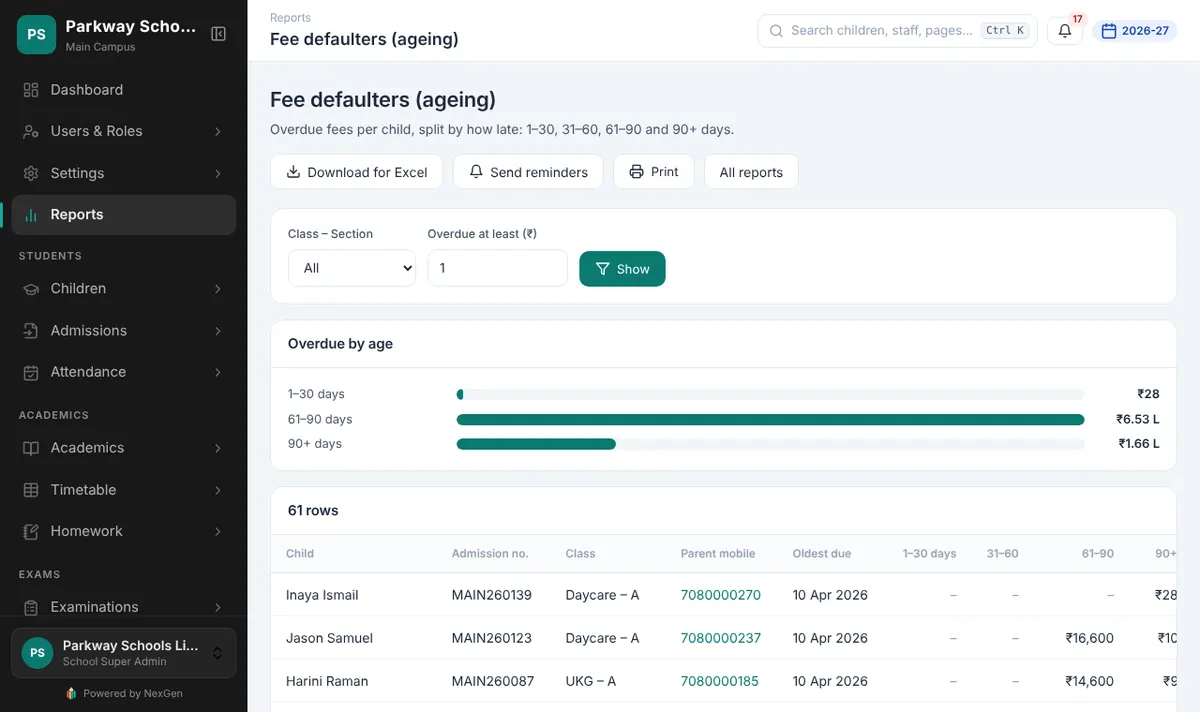
Collections by day, mode and head; defaulters by age; concessions.
Student reports
Strength by class, gender and category; new admissions and leavers.
Attendance reports
Daily, monthly and chronic absentees.
Operations reports
Transport riders by route, library overdue, low stock.
Export anywhere
Excel/CSV, print, and Tally XML for accounts.
Up and running in three steps
Log in
Your dashboard is ready.
Drill down
Open any report with filters.
Share
Print or export.
Good for everyone involved
Owner / correspondent
Collections and strength on the phone.
Principal
Attendance and academics daily.
Accountant
Every fee report ready.
Reports & Dashboards — FAQ
Can we export reports to Excel?
Yes, every report exports to Excel/CSV.
Can the owner see branch-wise numbers?
Yes, with Multi-branch, reports can be compared across branches.
Works well with
See Nexgen School with your own school's data
A 30-minute online demo, tailored to your school. We'll show the modules you care about — nothing else.