
A library desk that runs on a scan
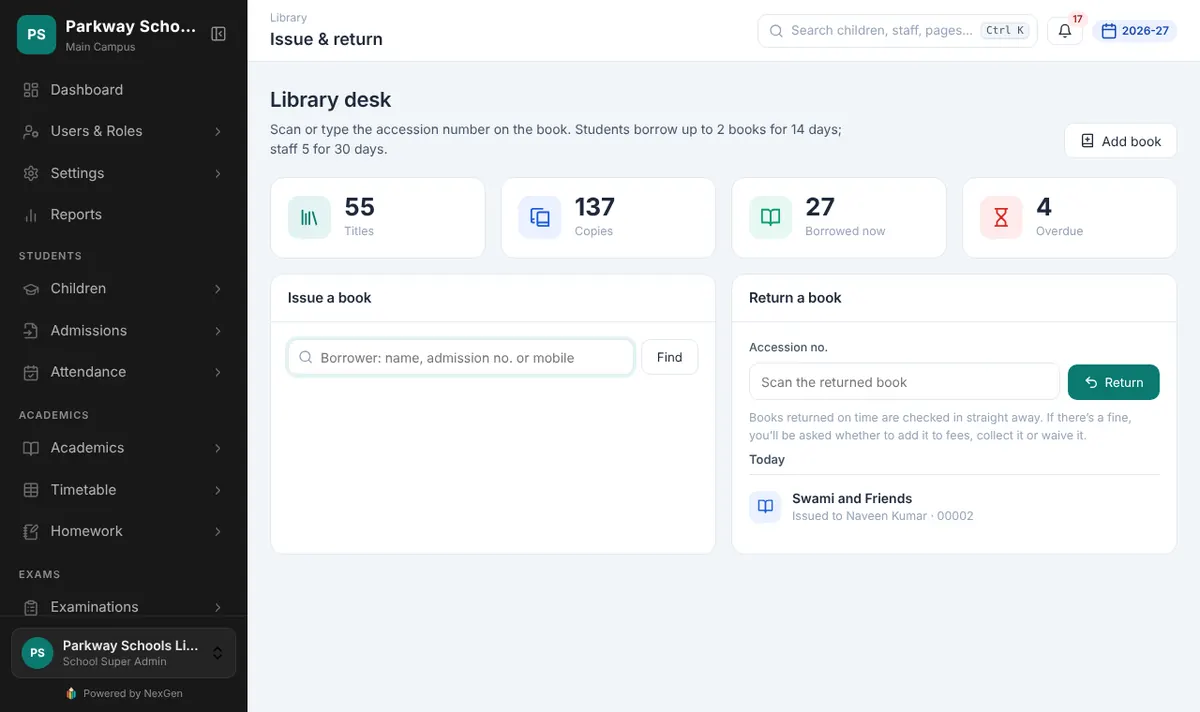
Catalogue your books once with accession numbers and print barcode labels. At the desk, scan the student's card and the book to issue; scan again to return. Due dates, fines and overdue lists take care of themselves.
What it fixes
- Issue registers that are impossible to search
- Books never returned by students who've left
- Annual stock verification that takes weeks
What changes
Catalogue, barcode labels, a fast issue/return desk, due dates and fines.
- No more registers.
- Know what's due and when.
- Reading habits across the school.
Everything in Library Management
Catalogue
Title, author, ISBN, category, shelf — with multiple copies and accession numbers.
Barcode labels
Print Code128 barcode labels for every copy.
Issue / return desk
Scan or type to issue and return in seconds; condition noted on return.
Students & staff
Both can borrow, with separate limits and loan periods.
Due dates & fines
Automatic fines for late returns, collected through the fee system.
Reports
Overdue books, most-read titles, issue history per student.
Parents & students
What's borrowed and when it's due — in the app.
Up and running in three steps
Catalogue
Add books or import a list.
Label
Print barcode labels.
Lend
Scan to issue and return.
Good for everyone involved
Librarian
No more registers.
Students
Know what's due and when.
Principal
Reading habits across the school.
Library Management — FAQ
Do we need a barcode scanner?
A USB scanner makes the desk faster, but you can also type accession numbers.
Can teachers borrow books?
Yes, staff are library members too.
Works well with
See Nexgen School with your own school's data
A 30-minute online demo, tailored to your school. We'll show the modules you care about — nothing else.