
Collect fees faster, chase defaulters less
Fee day shouldn't mean a queue at the counter and a ledger nobody trusts. Set up your fee structure once — terms, instalments, transport and concessions — and every receipt, balance and defaulter list is right, every time.
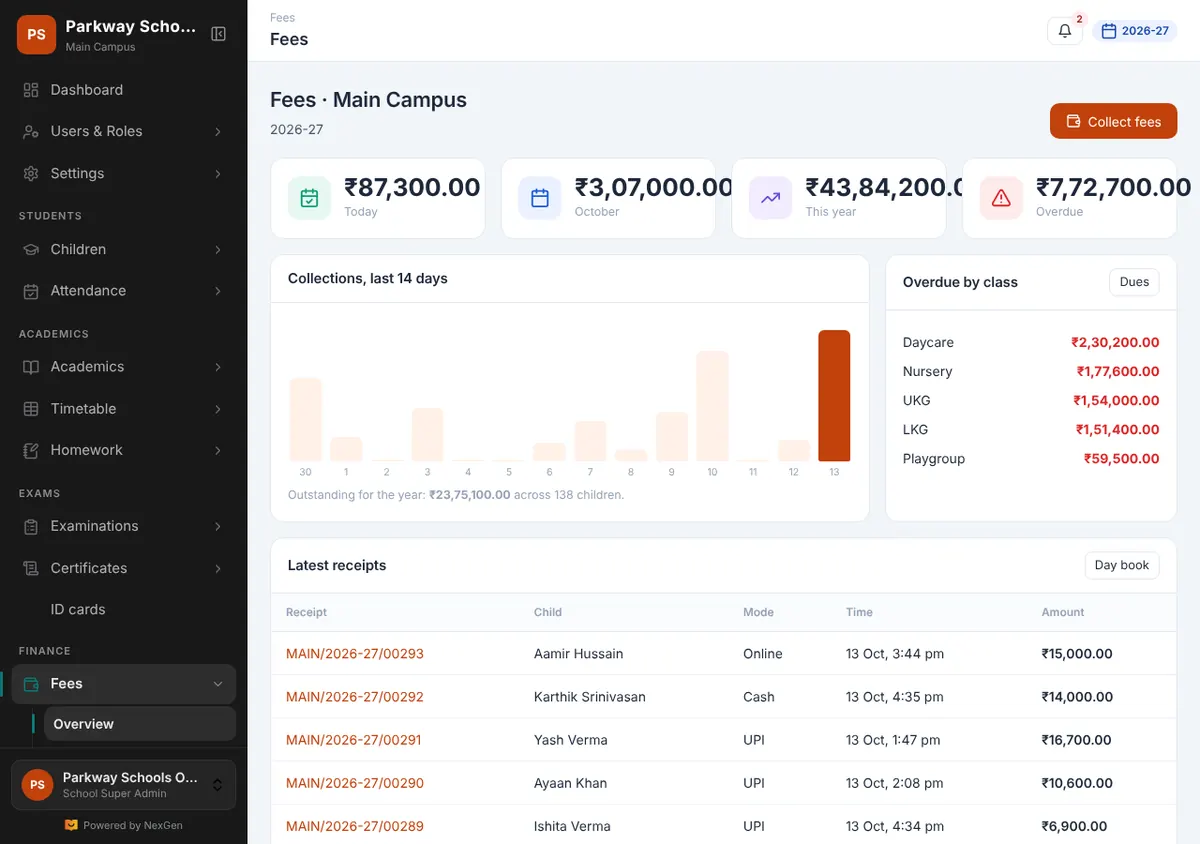
What it fixes
- Queues at the fee counter and handwritten receipts
- No clear list of who owes what, and for how long
- Concessions and sibling discounts applied differently by each clerk
What changes
Fee structures, concessions, counter receipts, defaulter lists and reminders that actually work.
- Receipts in seconds, reports without spreadsheets.
- Today's collection and outstanding on the phone.
- Balance, receipts and online payment in the app.
Everything in Fee Management
Class-wise fee structures
Tuition, term, annual, lab, transport and activity heads with your instalment dates.
Concessions that stick
Sibling, staff-ward, merit or management concessions set once per student and applied to every due.
Counter collection in seconds
Search the child, see dues, collect by cash, UPI, card, cheque or DD, print the receipt. Double-submit protection prevents duplicate receipts.
Professional receipts
Your receipt number series, school logo and amount in words — reprint any time.
Defaulters & ageing
Overdue by 1–30, 31–60, 61–90 and 90+ days, by class — with one-click reminders to those parents.
Cancellations with audit
Cancel a receipt only with a reason; every change is logged with who did it and when.
Online payments
Parents pay from the app; receipts and ledgers update by themselves (with Online Payments).
Accounts ready
Daily collection summary, head-wise reports and Tally XML export for your auditor.
Up and running in three steps
Set structure
Create fee heads, amounts and instalments per class.
Generate dues
Dues are created for every student, with concessions applied.
Collect & chase
Collect at the counter or online; send reminders to defaulters in one click.
Good for everyone involved
Accountant
Receipts in seconds, reports without spreadsheets.
Owner / correspondent
Today's collection and outstanding on the phone.
Parents
Balance, receipts and online payment in the app.
Fee Management — FAQ
Can we have different fees for different classes and new admissions?
Yes. Fee structures are per class, and you can add one-time heads such as admission fee only for new students.
Does it handle sibling and staff concessions?
Yes. Concessions are set per student as an amount or percentage, and apply to every future due.
Can our auditor use the data?
Yes. Head-wise collection reports export to Excel, and receipts export to Tally as XML vouchers.
What payment modes are supported at the counter?
Cash, UPI, card, cheque, DD and bank transfer — each with its reference number on the receipt.
Works well with
See Nexgen School with your own school's data
A 30-minute online demo, tailored to your school. We'll show the modules you care about — nothing else.